Where BIM › Home › Certifications › Measurement Capture
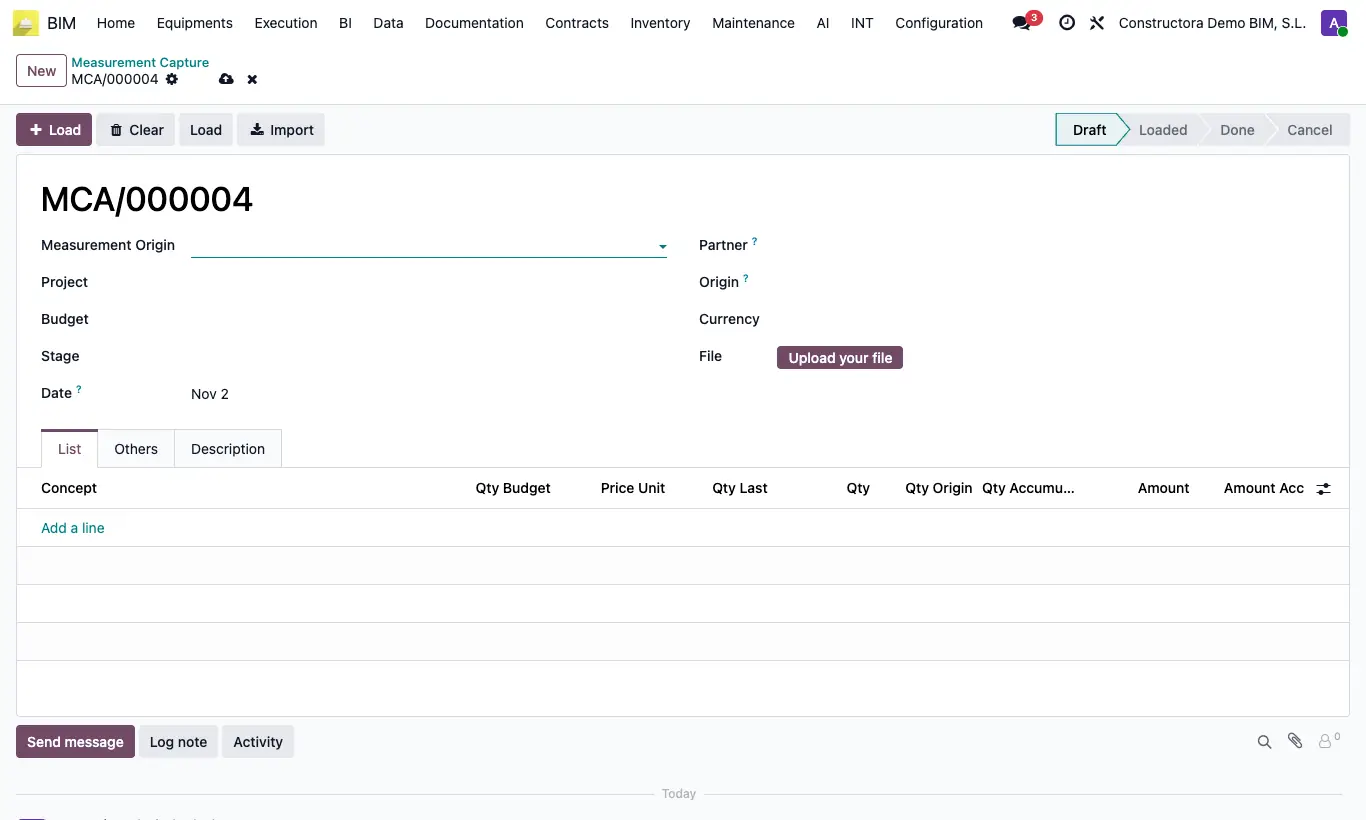
Steps
- First create the origins in Home › Certifications › Measurement Origin (e.g. site visit or customer request): Name and Description are enough.
- In Measurement Capture click New and fill in Measurement Origin (mandatory), Project, Budget and, if you wish, Stage, Date, Customer and Origin.
- Click the Load button with the + icon: it brings all the budget items with Qty Budget, Qty Last and Price Unit.
- If you prefer to add only some items, create them by hand in List and click the other Load button to complete their quantities and prices.
- You can also upload an Excel in File and click Import: column A the item's BIM ID, column B the quantity, with a header row.
- Type the period Qty or the accumulated Qty Origin (it calculates the period one and the Qty Accumulated).
- Click To Done. The capture stays in Done and ready to certify.
Warning
It does not let you finish if a Qty Origin exceeds the Qty Budget, or if all quantities are zero ("Debe introducir al menos una cantidad").
If the project has a Closing Expenses closed with a date equal to or later than the capture Date, it does not let you finish it.
Site note
Clear deletes all the lines; To Draft lets you edit again.
Finished captures feed the Executed column of the billing milestones.