Where Bim Expense › Bim Expense
BIM Expense see all documents profile. Expense accounts and journal in General Config.
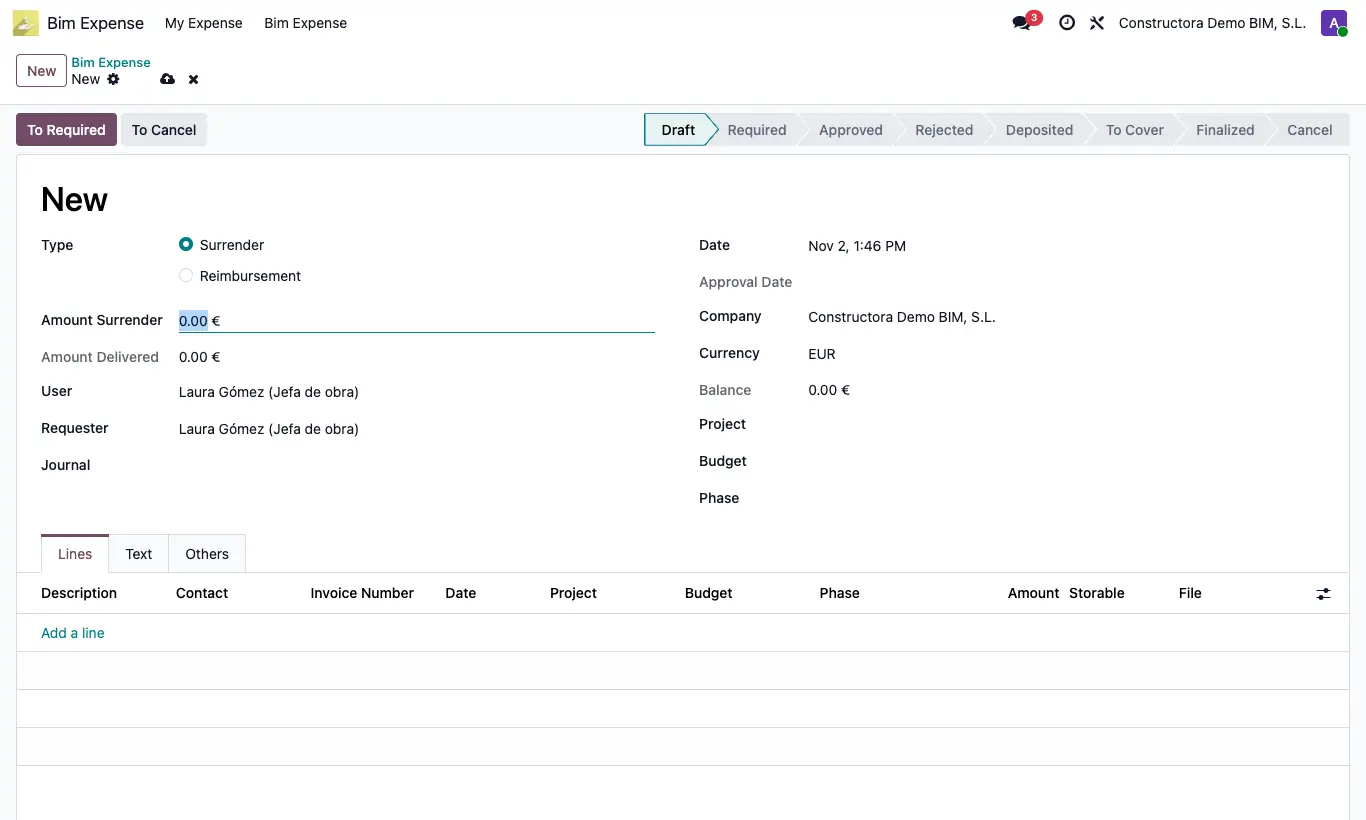
Steps
- Open the request in Required, type the Amount Delivered and click To Approved (or To Rejected).
- Choose the Journal (bank or cash) the money is handed out from and click To Deposited: the entry for the handover is recorded.
- On depositing, a Surrender moves to To Cover and a Reimbursement to Deposited (then click To Cover). When the expenses are justified, click To Finish; for reimbursements the balance entry is also recorded.
- In Finalized, click Create Invoices: one vendor bill is created for each non-storable line, with the analytic of its project.
- If you make a mistake, Delete Invoices removes those still in draft.
Depositing and Finishing use the keys cuenta_gastos_proveedores, cuenta_gastos_rendir and nombre_diario_gastos from General Config (by default 410000, 14131 and Miscellaneous Operations). They apply without company to all companies or with your company (that one has priority). If a key is missing it warns, for example, “You must configure the vendors account in the general settings, in the BIM module”.
The accounts indicated must exist in your chart of accounts: otherwise you get “The account … indicated in the BIM general configuration does not exist in the company …”. Set the key's Value to your account code.
Without Journal it will not let you deposit: “You must select a journal”.
The generated entries are shown in the Others tab.
To Cancel voids the request in any state.