Where Daily report › Employee Lines tab
Before you start
Report in Draft state.
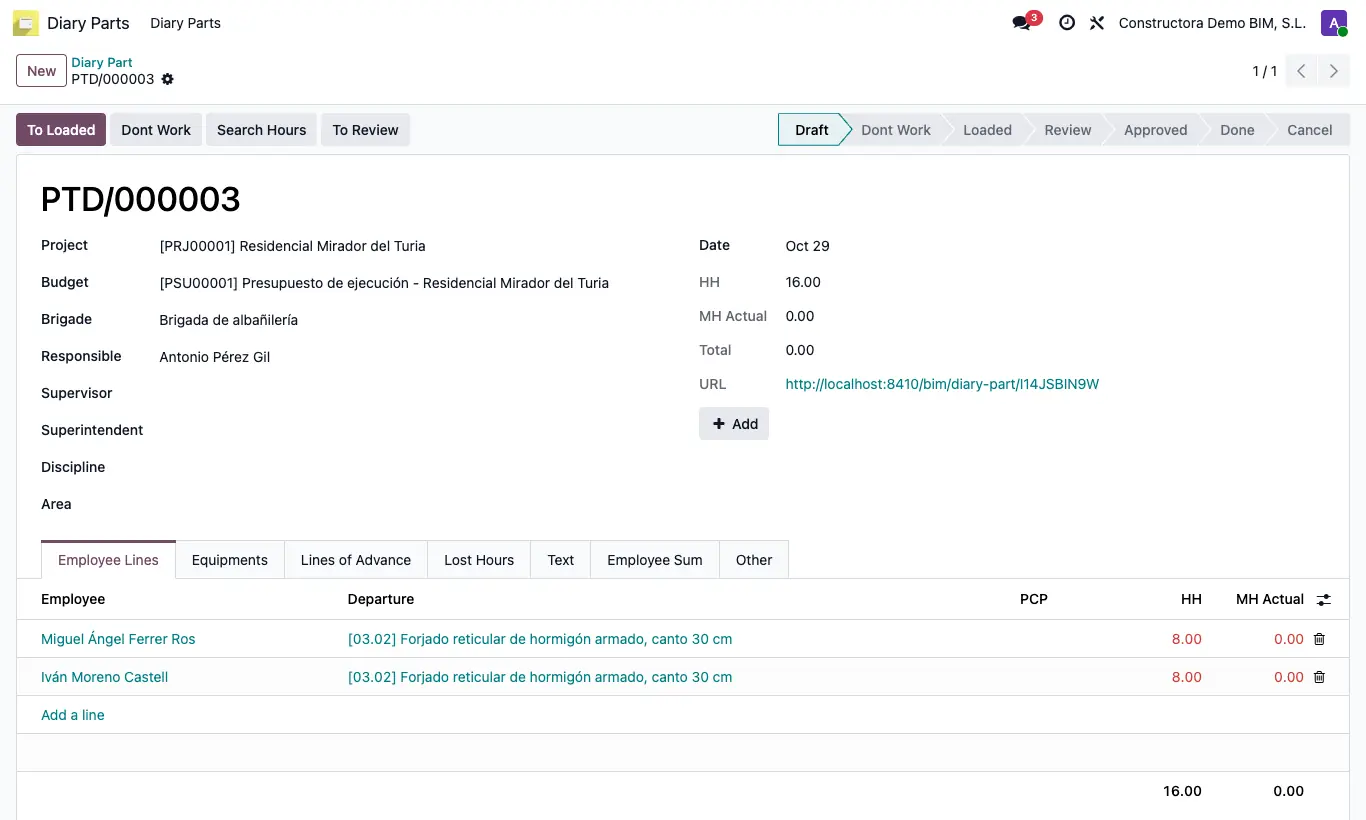
Steps
- Open the report in Draft.
- Table option: in Employee Lines write the HH of each row (employee + PCP) and, if you want, the budget Departure.
- Button option: click Add (next to the URL field), choose the Employee, write the HH of each PCP and click Done. It only changes the lines of that report.
- Matrix option: open the link in the URL field. You will see a table with employees in rows and PCPs in columns; write the hours and click Save.
- To bring in the clocked hours, click Search Hours: it adds the attendance entries starting on the report's day and spreads that total across the employee's lines according to their HH (equally if all are at 0).
- Rows in red have HH different from MH Actual; correct them before moving the report to Loaded.
Warning
The matrix link does not ask for a user: while the report is in Draft, anyone who has it can change the HH. Share it only with the foreman.
If an employee has no attendance that day, Search Hours leaves their MH Actual at 0.
Site note
When the report leaves Draft, the matrix still opens but for consultation only: the cells are locked and Save disappears.