Where BIM › INT › Concepts importer › Bim Template Xls
Before you start
BIM Integrations profile.
Steps
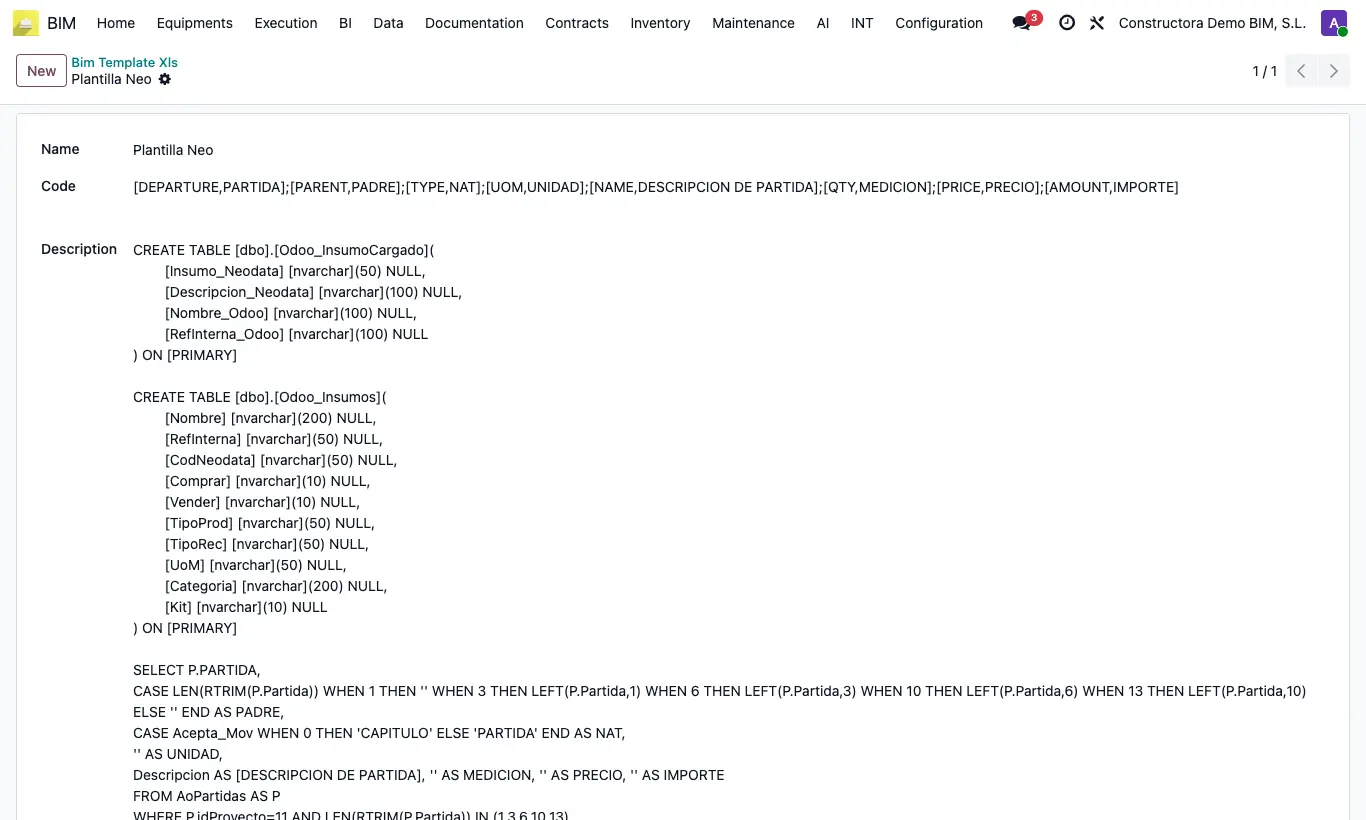
- Go to INT › Concepts importer › Bim Template Xls and click New.
- Give it a Name and check the Code: it already holds the field → header correspondence of your Excel, with each pair separated by a semicolon: [DEPARTURE,PARTIDA];[PARENT,PADRE];[TYPE,NAT];[UOM,UNIDAD];[NAME,DESCRIPCION DE PARTIDA];[QTY,MEDICION];[PRICE,PRECIO];[AMOUNT,IMPORTE].
- Change only the second word of each pair to the real name of your column.
- In Work Database Concept Importer create a job with Version: Template XLS, choose the template in Template XLS, the Project and the file.
- Click Import and check the budget created.
Warning
Keep the pairs separated by semicolons: if you separate them with commas, the columns get mixed up.
If any of the eight fields is missing, "Check the template header at position: …" appears.
Site note
In the type column, CAPITULO, PARTIDA, MO or Mano de Obra, MAT or Materiales, EQUIPO or Equipos are valid. Any other value is taken as an item.
The parent column must contain the code of the parent concept; parents must come before their children.