Where BIM › Home › Certifications › Billing Milestones
To invoice, Invoicing permission in Accounting. The project must have a customer.
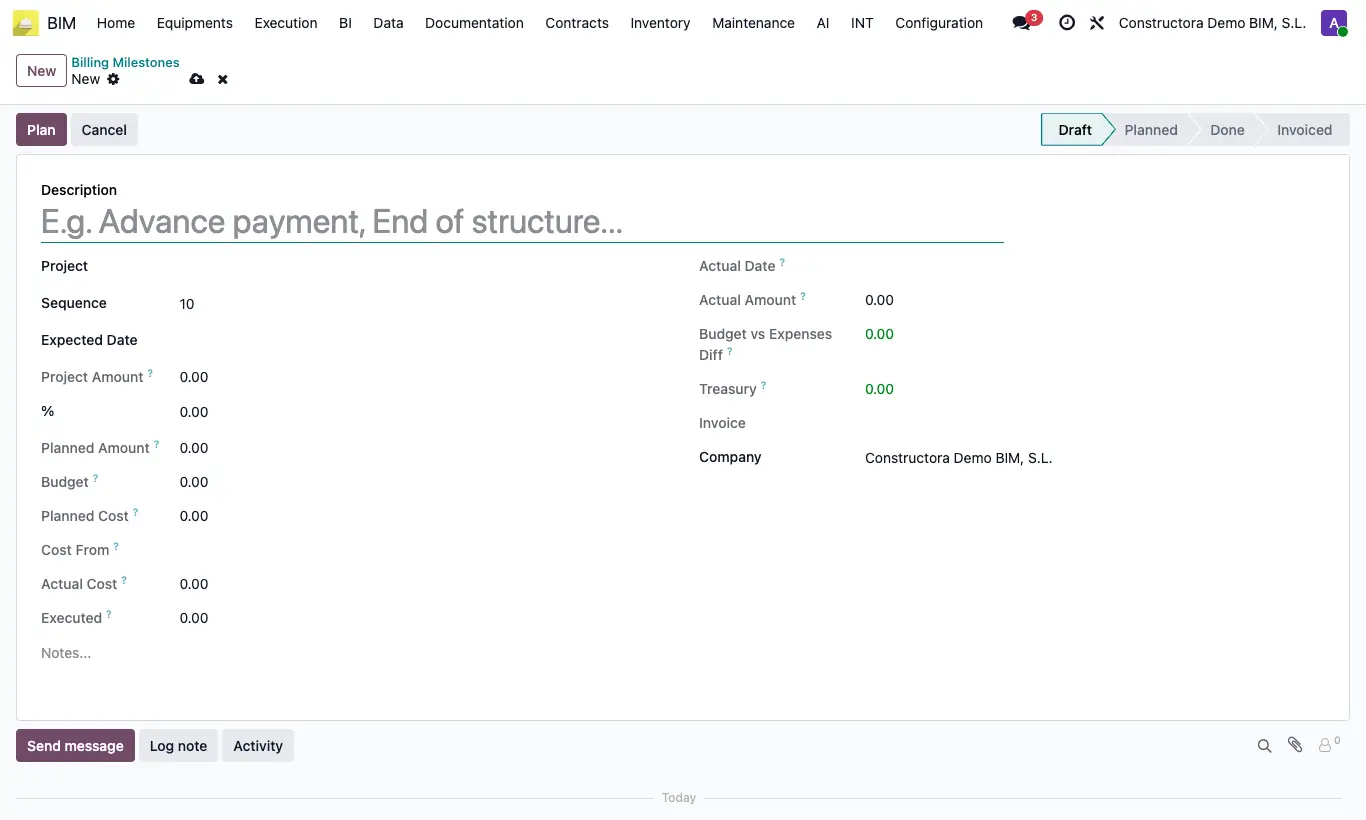
Steps
- Go to Billing Milestones and click New (or use the project's Billing Milestones button).
- Write the Description (e.g. Advance payment), the Project, the Expected Date and the %. The Planned Amount = Project Amount × %.
- Click Plan (it changes to Planned) and, when the milestone is met, Done.
- Click Action Invoice: a draft customer invoice is created for the planned amount and the milestone changes to Invoiced.
- When the invoice is posted, the milestone's Actual Date takes the invoice date and the Actual Amount its taxable base.
The % must be between 0 and 100, and it is only invoiced in Done with an amount greater than zero.
It does not let you go back to draft if the invoice has payments or credit notes, nor Cancel a milestone whose invoice is still active: "The milestone … has an active invoice. Cancel it first."
A milestone that is invoiced or has a draft invoice cannot be deleted.
The milestone is invoiced with the Payment Status Product from the project form and, if it has none, with the Product from Settings › Bim 2.0 › INVOICING.
Milestones feed the BI dashboard per project.
If the posted invoice goes back to draft or is cancelled in Accounting, the Actual Date is cleared.
With the invoice posted and no payments, Back to Draft also returns the invoice to draft; when you Action Invoice again that same invoice is updated.