Where BIM › Config › Configuration
Before you start
BIM Manager profile and Administrator role.
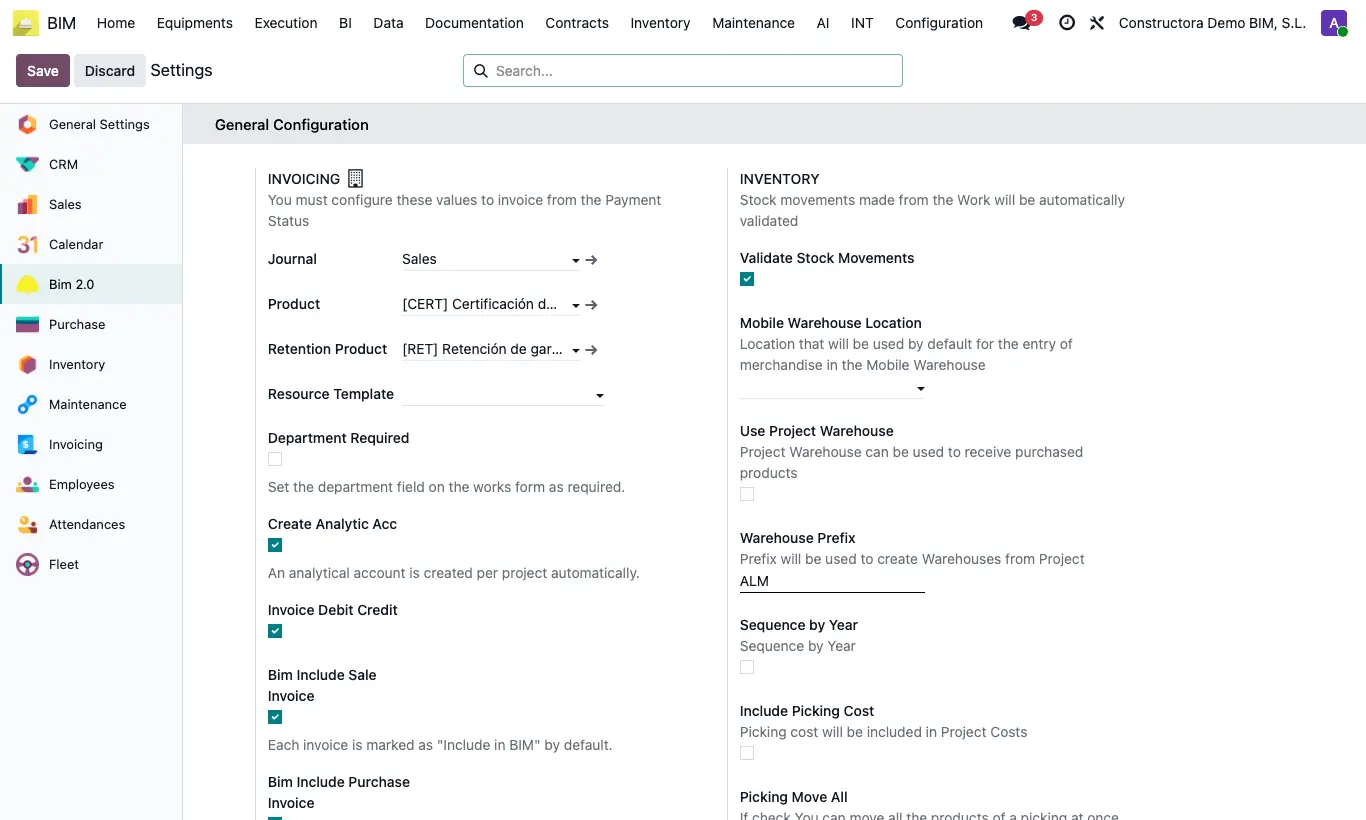
Steps
- Open the Bim 2.0 settings and find the INVOICING block within General Configuration.
- Journal: journal used to invoice payment statuses to the customer. If you leave it empty, the company's first sales journal is used (purchase invoices always use a purchase journal).
- Product: product of the invoice line for the payment status and the milestones when the project does not have its own Payment Status Product (project's Accounting tab); leave its prices at zero. Without any, the invoice uses the default account and taxes from Accounting.
- Retention Product: product used to invoice the payment status retention.
- Department Required forces Departament to be filled in on new projects. Create Analytic Acc creates an analytic account per project when it is created.
- Invoice Debit Credit: default value of the box of the same name on each new payment status. Ticked, the invoice uses the total amount of each line (with its certification factor); unticked, the base amount.
- Bim Include Sale Invoice, Bim Include Purchase Invoice and Include Refund: new invoices of that type (for refunds, vendor ones) are created with Include For Bim ticked. Bim Invoice Multiple Projects: new invoices are created marked as multi-project.
- Click Save.
Warning
Keep Create Analytic Acc enabled: without it the project does not collect its expenses.
Changes only affect projects, invoices and payment statuses created from now on.