BIM 2.0Odoo 19

Process manual

Search for what you want to do and follow the steps. Each process shows where it is in the menu, what you need first and which mistakes to avoid.

The life of a project

Scheduling and progress tracking

How do I see which items are late against the baseline?The tracking list compares each item with the baseline and shows its actual progress.

Where Budget › Scheduling tab › Variance
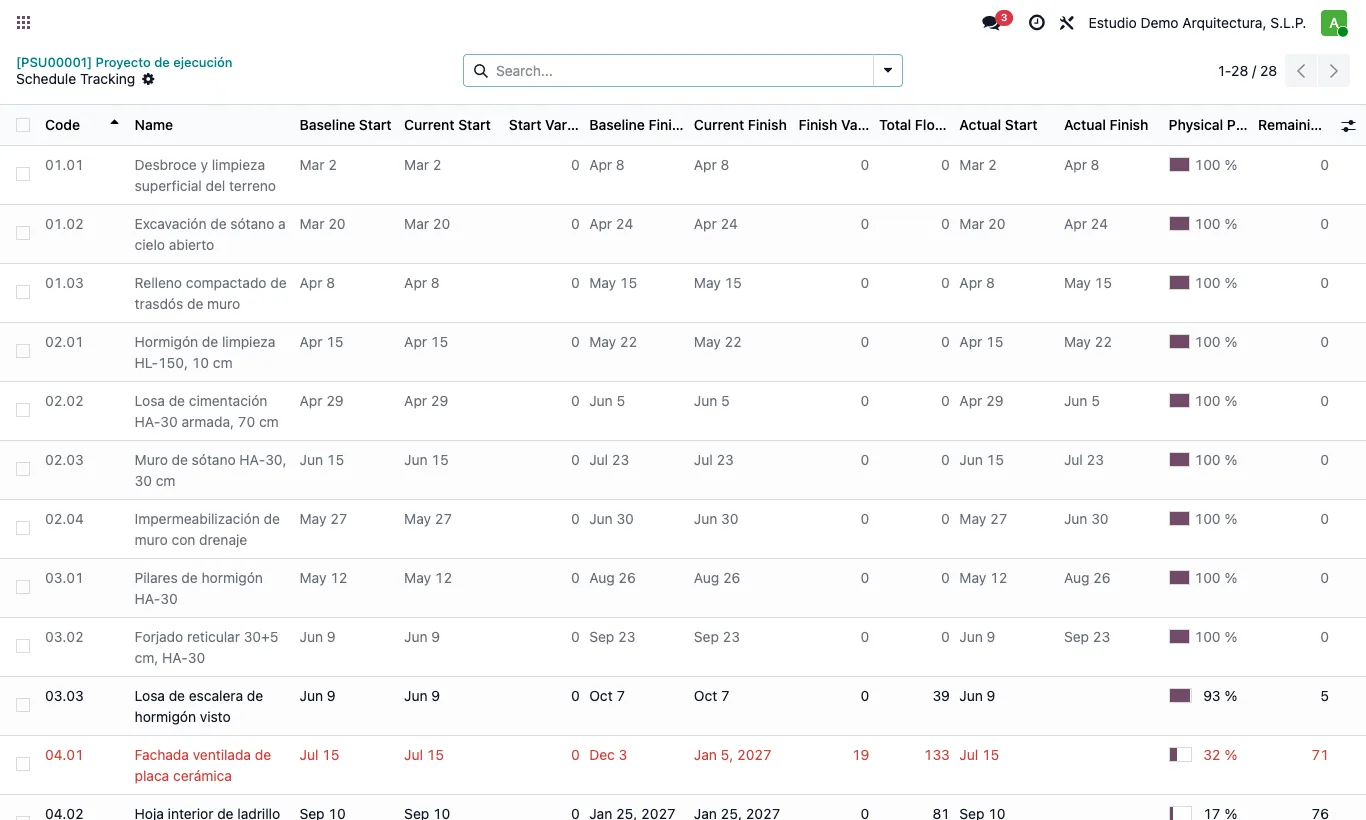
How do I see which items are late against the baseline?

Steps

  1. In the budget's Scheduling tab click Variance.
  2. Each item shows Baseline Start and Current Start, Baseline Finish and Current Finish, and their variances in working days (positive = later).
  3. Items finishing later than in the baseline are in red; finished items, in grey.
  4. You can type the Actual Start, Actual Finish and Physical Progress (%) right here.
Site note

The item form has the same baseline dates and the Finish Variance (d).

Documented version: BIM 2.0 (base_bim_2 19.0.19.04.2026) · Odoo 19