Where BIM › BI › BI › Result Table
Before you start
BI User or BI Administrator profile.
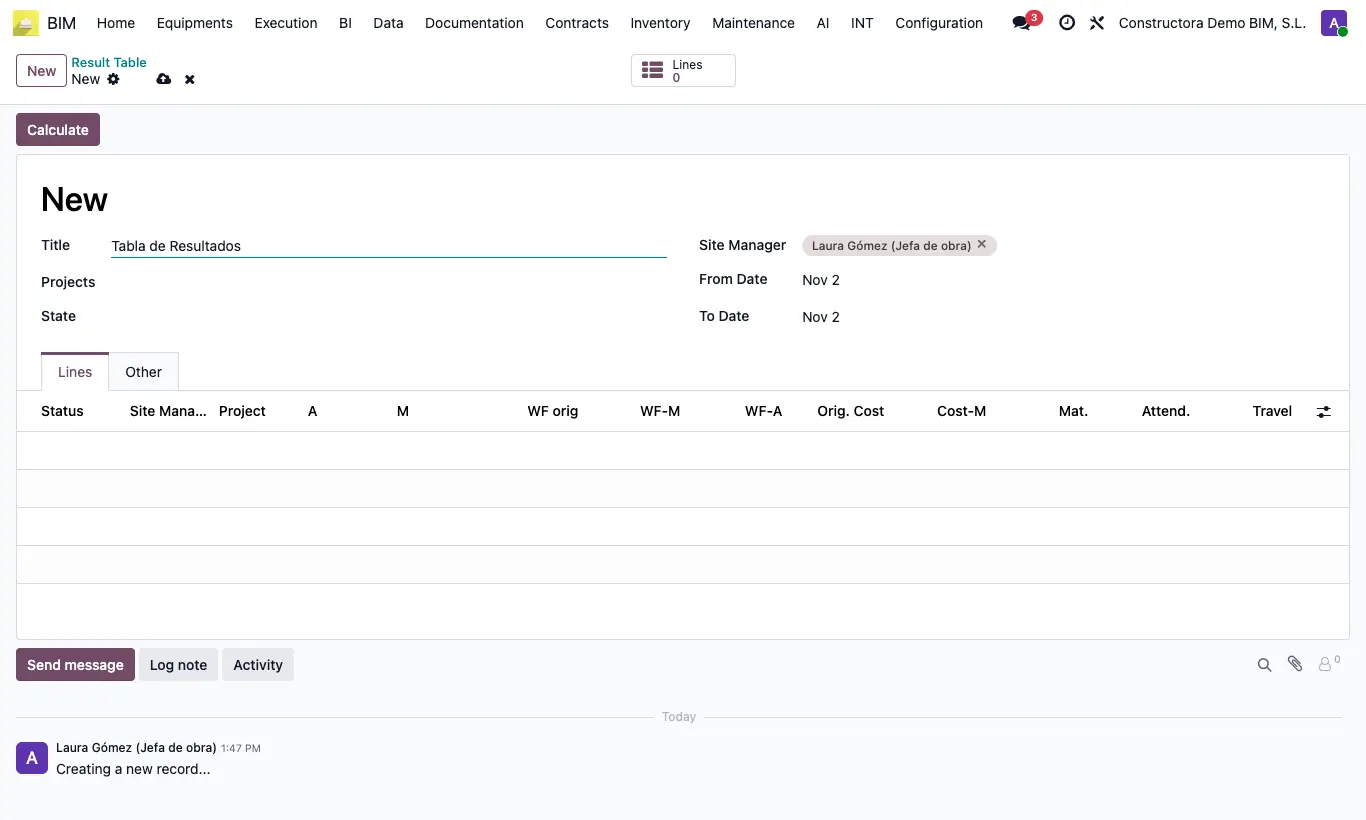
Steps
- Go to BI › BI › Result Table and click New.
- Enter From Date and To Date.
- Filter by Projects, by project State or by Site Manager. Without filters, all projects are included.
- Click Calculate: one line is created per project and month.
- Read the columns: WF orig, WF-M and WF-A (billed); Orig. Cost, Cost-M and Cost-A (cost), broken down into Mat., Partner., Attend., Travel and Others; A/P-M and A/P-A; OENC-M and OENC-A (work executed but not certified); R-Orig and R-A (result); %GM orig, %GM-A, %NM orig and %NM-A.
- With the Lines button you open them in a list to filter and export.
Warning
If you are not a BI Administrator, you can only calculate if you are the only Site Manager selected; otherwise it warns “You do not have the necessary permissions to perform this action.”
Each calculation deletes the previous lines of that table.
Site note
Columns ending in M are for the month, in A for the year and in orig since inception. Show or hide columns with the optional columns icon.
Completed Other Expenses go into the Others column.