Where BIM › Execution › Daily Parts › Daily Parts (or Daily Parts app)
Before you start
A crew created. The Daily Parts app requires the Diary Part profile.
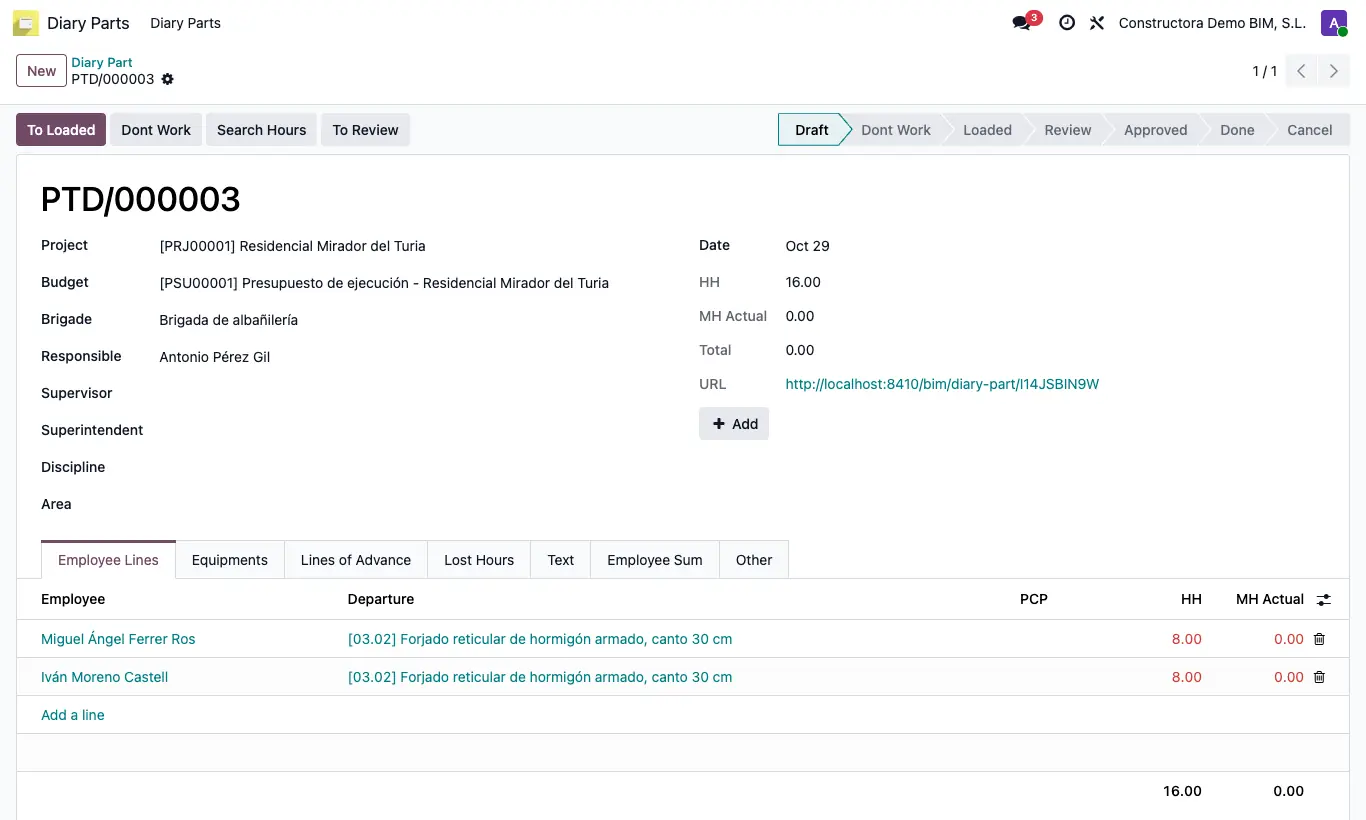
Steps
- Go to Execution › Daily Parts › Daily Parts and click New.
- Choose Project, Budget, Date and Brigade: managers, one line per employee and PCP in Employee Lines and one line per PCP in Lines of Advance are loaded.
- Write each employee's HH (or use the matrix in the URL field or the Add button) and click Search Hours: it brings in each employee's attendance for that day as MH Actual and spreads it across their lines in proportion to their HH.
- In Equipments add each Assigned Equipment with its Qty; in Lines of Advance, the executed Qty and the Status of each PCP; in Lost Hours, the unproductive ones.
- Click To Loaded: each line's data is completed along with the Employee Sum tab.
- Click Approve and, when closing, To Done (state Done). Use To Review or To Draft to correct.
- If no work was done that day, click Dont Work while in Draft.
Warning
With the key blok_aprove_part set to 1 (BIM › Config › General Config), Approve requires that, for each employee, the sum of their HH equals their MH Actual. If it does not match, it warns "The hours of employee … differ from the hours worked" with the name of the employee to correct.
Changing the Brigade, or the PCP in the Other tab, regenerates the employee lines and the HH written are lost.
Site note
The IPR of each progress line is the report's total HH divided by the quantity executed.
Lines can only be edited in Draft.