Where BIM › INT › APU importer › Concept Template Import
Before you start
BIM Integrations profile.
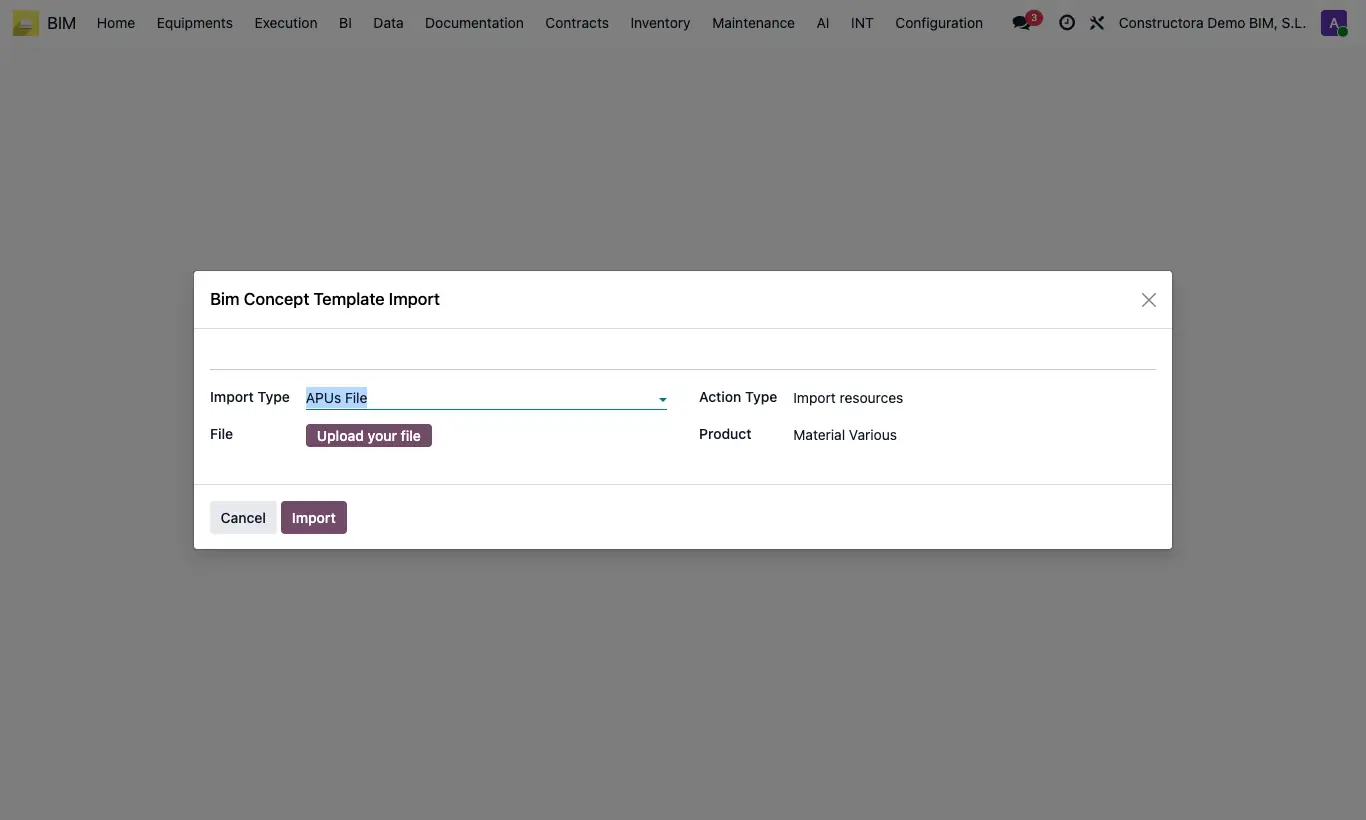
Steps
- Go to INT › APU importer › Concept Template Import.
- In Import Type choose APUs File (CSV), APUs Url (CSV published on the internet), BC3 File, Budget (CSV, asks for the Project) or Product (CSV).
- Upload the File (or type the CSV URL).
- In Action Type: Create and update resources registers products that do not exist and updates name and price; Import resources uses the chosen Product for those that do not exist.
- Click Import.
Warning
CSV files must have the .csv extension; otherwise "El fichero debe tener extensión .csv" appears.
With Budget a new budget called "Importado desde CSV" is created in the chosen project.
Site note
The CSV uses the headers code, parent, name, type, uom_id, price, quantity, available, group, sub_group, performance, hours_day. In type: 1 chapter, 2 item, 3 material, 4 labor, 5 equipment, 6 others, 7 note.
With BC3 File, each BC3 chapter becomes a group and each item a unit price with its resources.
The easiest CSV model is to export one: Actions › Bim Concept Template Export in the unit price list.
For very large BC3 databases, use Import APU Step by Step (BC3).