BIM 2.0Odoo 19

Process manual

Search for what you want to do and follow the steps. Each process shows where it is in the menu, what you need first and which mistakes to avoid.

The life of a project

Scheduling and progress tracking

How do I save a baseline and compare the schedule with it?A baseline is a snapshot of dates, durations and amounts to measure delays and earned value.

Where Budget › Scheduling tab › Save baseline
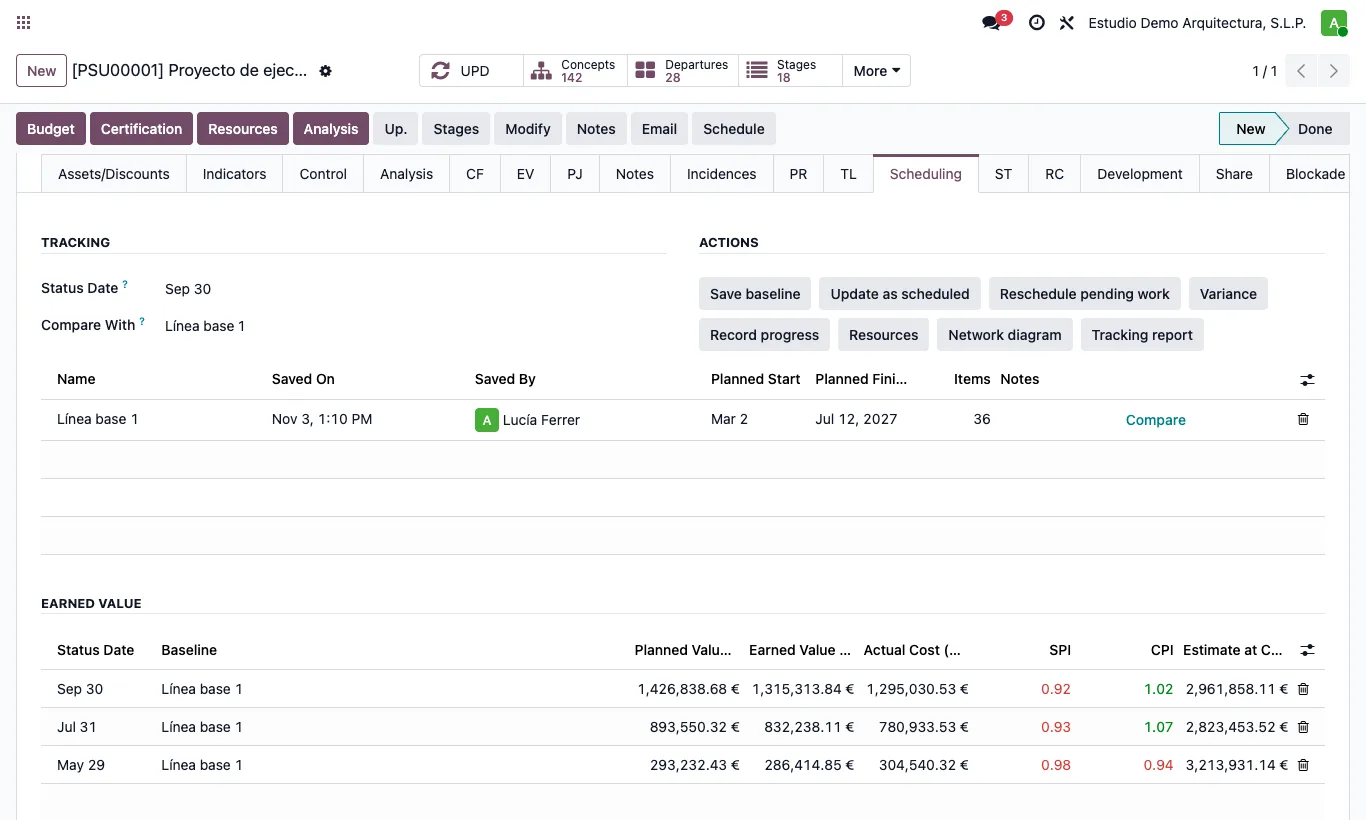
How do I save a baseline and compare the schedule with it?

Steps

  1. Schedule the project and save the Gantt.
  2. In the budget's Scheduling tab click Save baseline.
  3. The new baseline goes into Compare With. You can save several (before and after a design change) and choose which one to compare with by clicking Compare in the list.
  4. In the Gantt the Baseline button shows the saved dates in grey under each bar.
Site note

Rename the baseline in the list itself (for example "Contract" or "Change order 1").

Documented version: BIM 2.0 (base_bim_2 19.0.19.04.2026) · Odoo 19