Where Budget › CF tab
Before you start
BIM Administrator profile. Stages created in the budget.
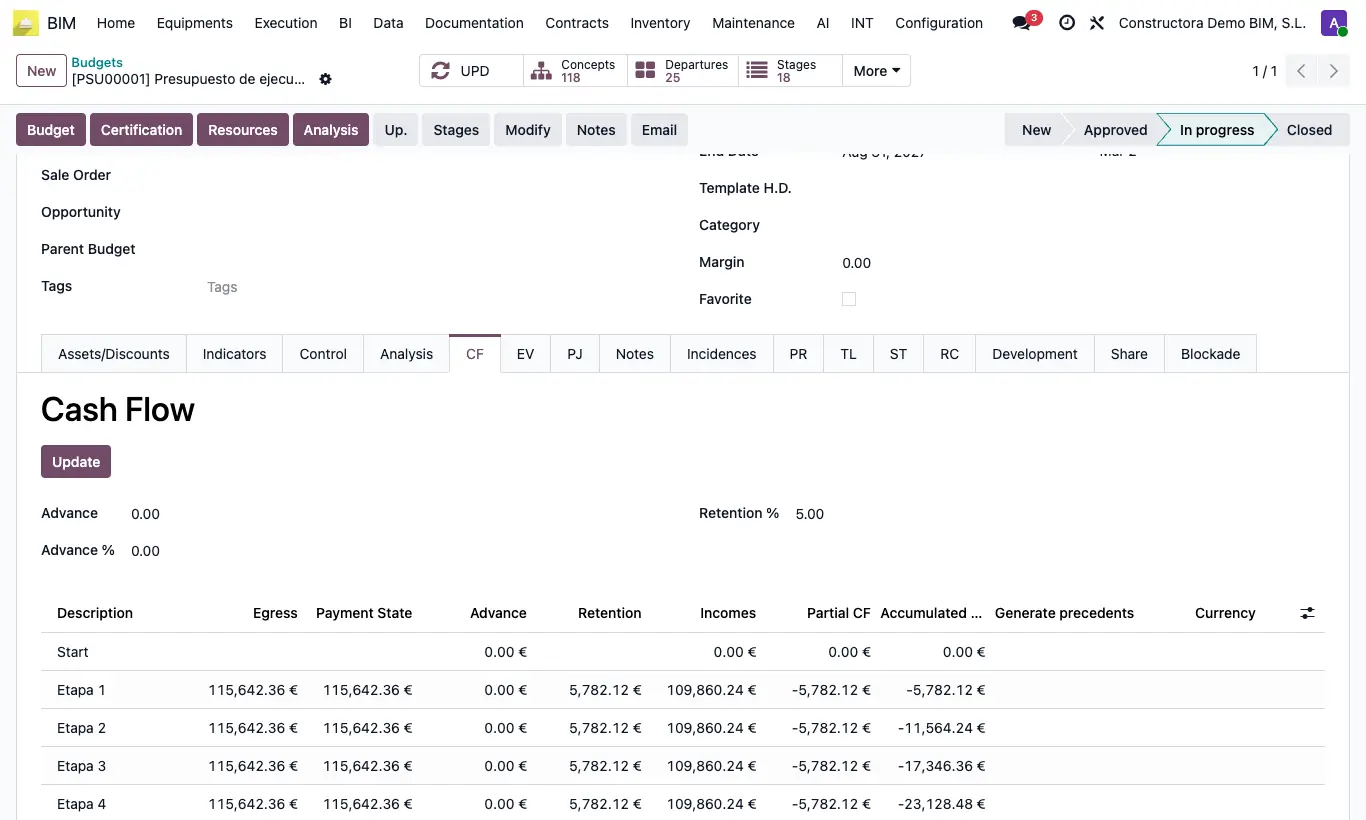
Steps
- Open the budget and the CF tab.
- Enter the Advance as an amount or as Advance %: one calculates the other.
- Check the Retention %, which comes from the project.
- Click Update (with an advance, it is also recalculated on save).
- Read the table: the Start row collects the advance; each stage has Egress (its planning), Payment State (Egress × certification factor), the Advance that is deducted, the Retention, the Incomes, the Partial CF and the Accumulated CF.
- The End row returns the sum of the retentions: it is the forecast of the retention collection.
Warning
It does not calculate without stages: “You must generate some stages before updating the cash flow!”
The Egress comes from each stage's planning: click UPD if the planning has changed.
Site note
The advance is deducted in equal parts across all stages.