Where BIM › Equipment › TMS › Transport equipment
Before you start
Brands and models created in BIM › Config › Equipment, if you use them.
Steps
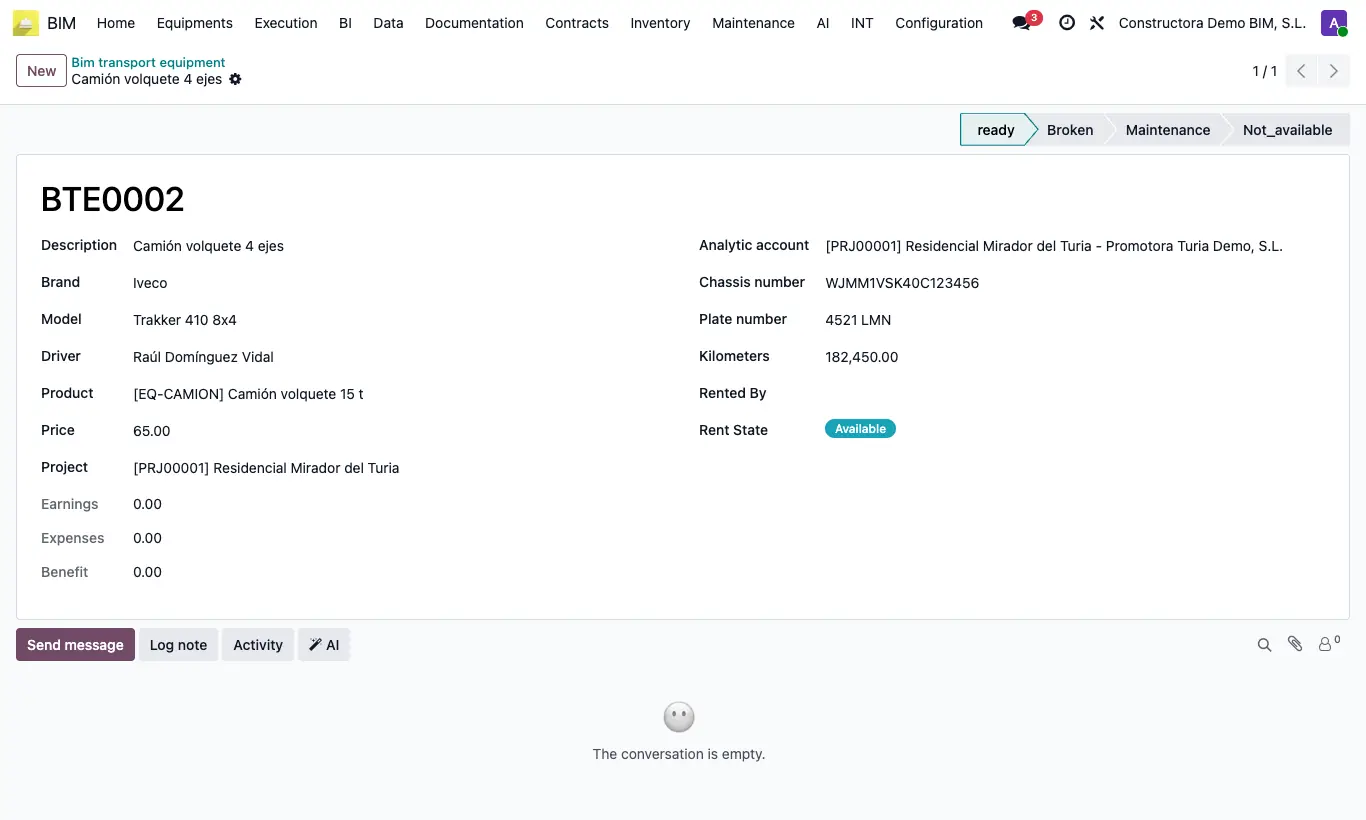
- Go to Equipment › TMS › Transport equipment and click New: the code is assigned automatically on saving.
- Write the Description (required) and choose Brand and Model (only the models of that brand appear).
- Choose the Driver and the usual Project; if you want, the Product and the Price.
- Complete Analytic account, Chassis number, Plate number and Kilometers, and save.
- Change its status by clicking on the status bar: ready, Broken, Maintenance or Not_available.
Warning
Earnings, and with it Benefit, does not come from this equipment's trips: trips are recorded with the fleet equipment (Equipment › Equipment › Equipment). Treat only Expenses as a reliable figure.
Site note
When you record an expense in Equipment › TMS › Expense record, choosing this equipment in Equipment suggests its Driver and its Project.
Expenses adds up the Amount of all the expenses recorded with this equipment.