Where BIM › Data › Employee Tools › Tools Delivery
Products with Tool ticked. To create a delivery note, the employee needs a user or a contact with the same name.
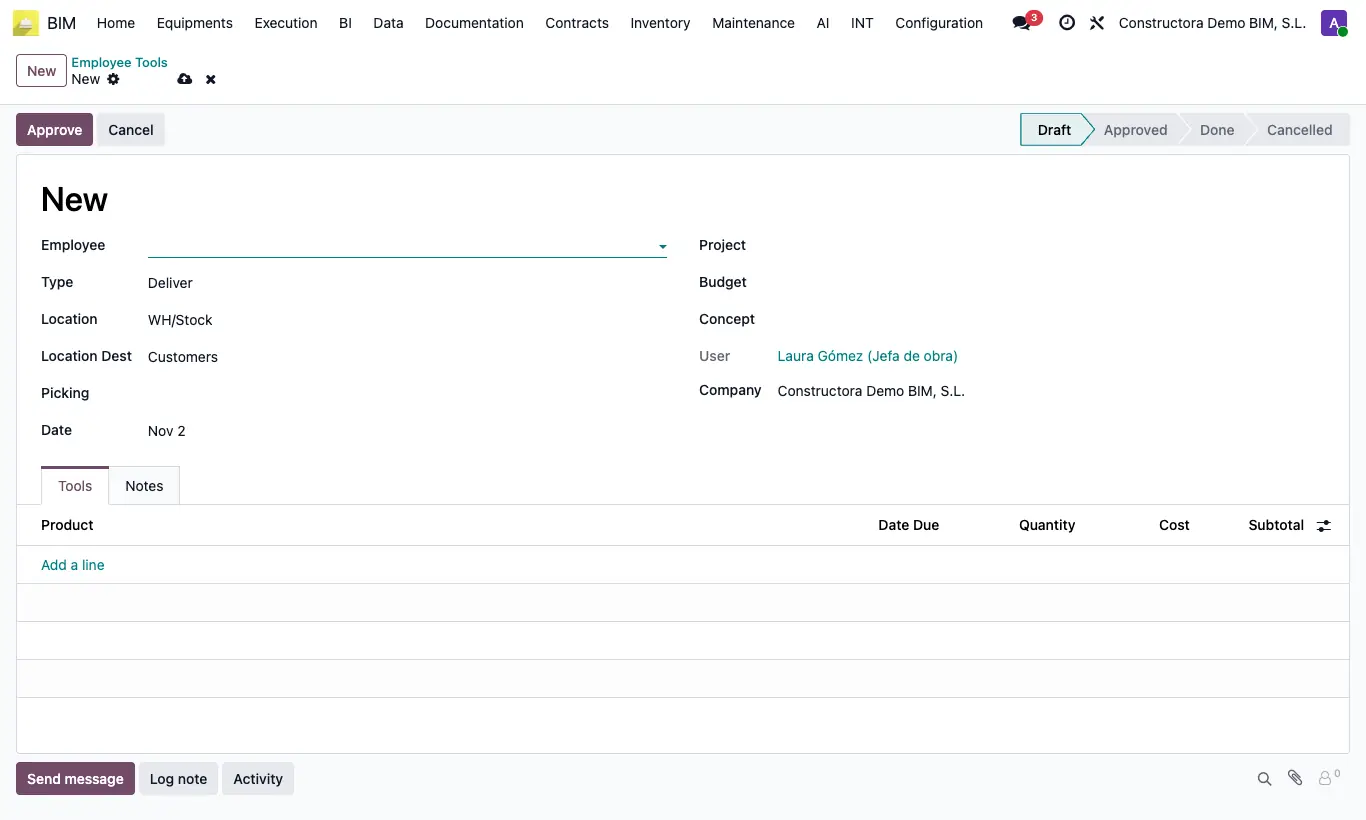
Steps
- Go to Data › Employee Tools › Tools Delivery and click New.
- Choose the Employee, the Date and the Project (required); if you want, Budget and Concept.
- Check Location (source) and Location Dest.
- In the Tools tab add each Product with Quantity; the Cost and the Date Due fill in by themselves.
- Click Approve and then Confirm: the document becomes Done and, with inventory movement turned on, the outgoing delivery note is created and validated.
Approve without lines warns "You must add some tools!".
With inventory movement turned on, if the employee has no user or contact with their name: "The employee … has no associated address."
If there is no outgoing operation type, "No operation type is configured for this delivery note" appears.
The Date Due is the date plus the product's Deprecation Days; with that data the field is locked.
Tools Inventory Movement, in the Bim 2.0 settings, decides whether deliveries and withdrawals create a delivery note. It comes turned on; turn it off if you only want to record who has each tool.
The delivery note uses the outgoing type of the project's warehouse or, if the project has no warehouse, the company's first outgoing type.