Where BIM › Inventory › Material Request › Material Request
Before you start
The request in New state and with the Project chosen.
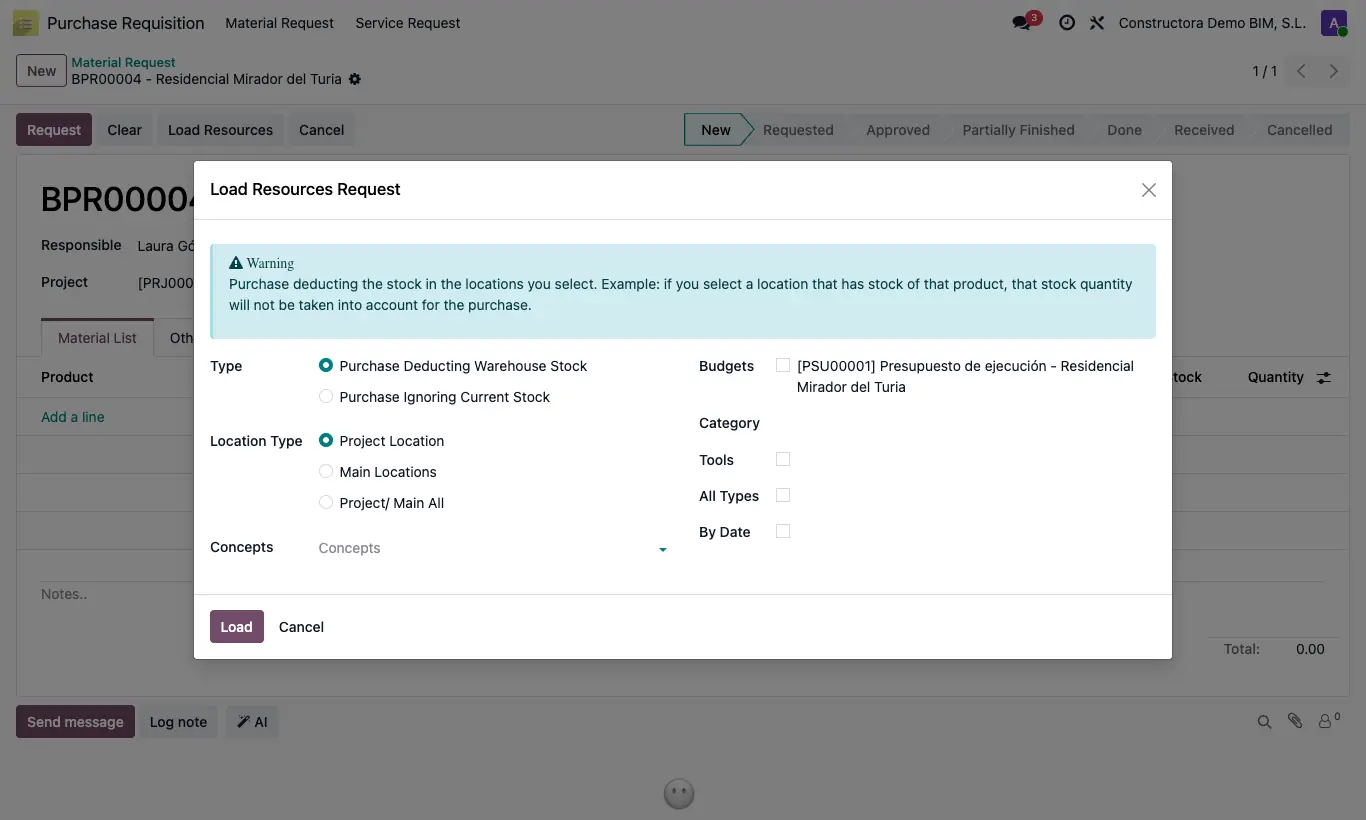
Steps
- Open the request and click Load Resources.
- Choose the Type: Purchase Deducting Warehouse Stock or Purchase Ignoring Current Stock.
- If you deduct stock, indicate where to look in Location Type: Project Location, Main Locations or Project/ Main All.
- Tick one or several Budgets of the project.
- To narrow it down, choose Concepts (specific items), a Category or turn on By Date with Date From and Date To (item start date).
- By default it only loads materials; turn on All Types to also bring equipment and labor, or Tools to load only storable equipment and tools.
- Click Load and check the lines: quantity, Supplier (the first one on the product form) and Cost.
Warning
With Project Location or Project/ Main All, the project must have a warehouse; otherwise the notice "The project location must be set before loading the resources" appears.
If nothing is left to order, "There are no materials to request in the selected budgets" appears.
Site note
The proposed quantity is what was budgeted minus what was already requested and approved in other requests, so you can load several times without duplicating.
Products that are already in the request are not loaded again.
With Tools only equipment-type resources whose product has inventory control come in, with their sale price as Cost; materials are not loaded.