Where BIM › Home › Projects › Resource Balancing
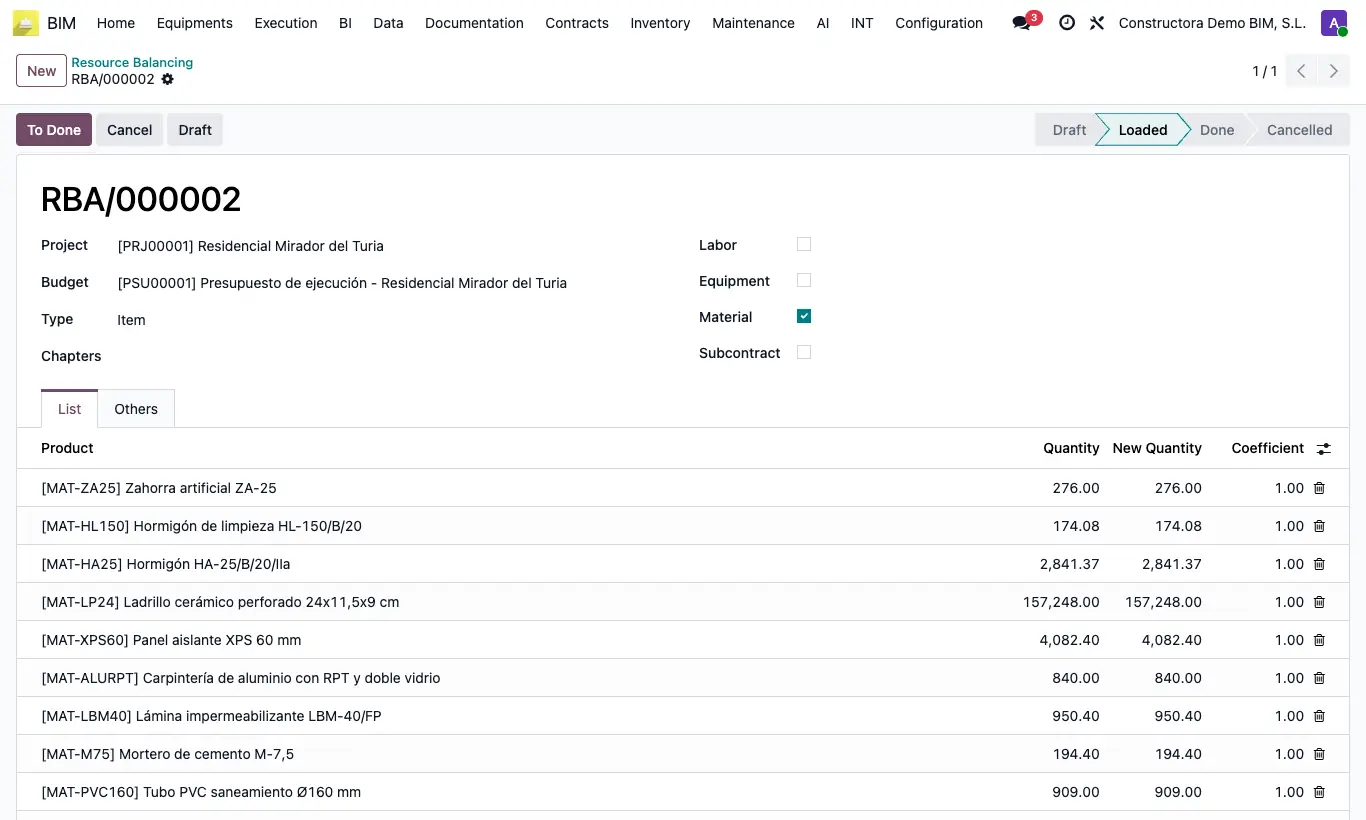
Steps
- Go to Home › Projects › Resource Balancing and click New.
- Choose the Project and the Budget. If you only want some chapters, choose them in Chapters.
- Tick the types you want to review: Labor, Equipment, Material and Subcontract (labor and equipment come ticked).
- Click Load Data: the List tab shows one line per product with its total Quantity. The state changes to Loaded.
- On the lines you want to adjust, write the New Quantity: the Coefficient is calculated automatically (new ÷ current). Changed lines are shown in red.
- Click To Done: the quantity of that resource in each item is multiplied by its Coefficient.
- Click UPD in the budget to recalculate the amounts.
Warning
To Done changes the budget quantities, and going back to Draft does not undo them. Save a history first if you are not sure.
If a resource has no product, Load Data stops with "The concept … has no associated product.".
Load Data and Clear Data are only in Draft: to read again, click Draft and then Load Data.
Do not change the New Quantity of a line with Quantity 0: the coefficient cannot be calculated.
Site note
The Quantity is resource quantity × item quantity; for labor and equipment it is also multiplied by the item's Apu Duration (hr).
With Chapters, only items hanging directly from those chapters count.
Show the optional Concepts column to see which budget resources each line adds up.