BIM 2.0Odoo 19

Process manual

Search for what you want to do and follow the steps. Each process shows where it is in the menu, what you need first and which mistakes to avoid.

The life of a project

Artificial Intelligence

How do I use the AI assistant in the budget?Create chapters, items and measurements, change prices or query the budget.

Where Budget › Concepts › wand icon
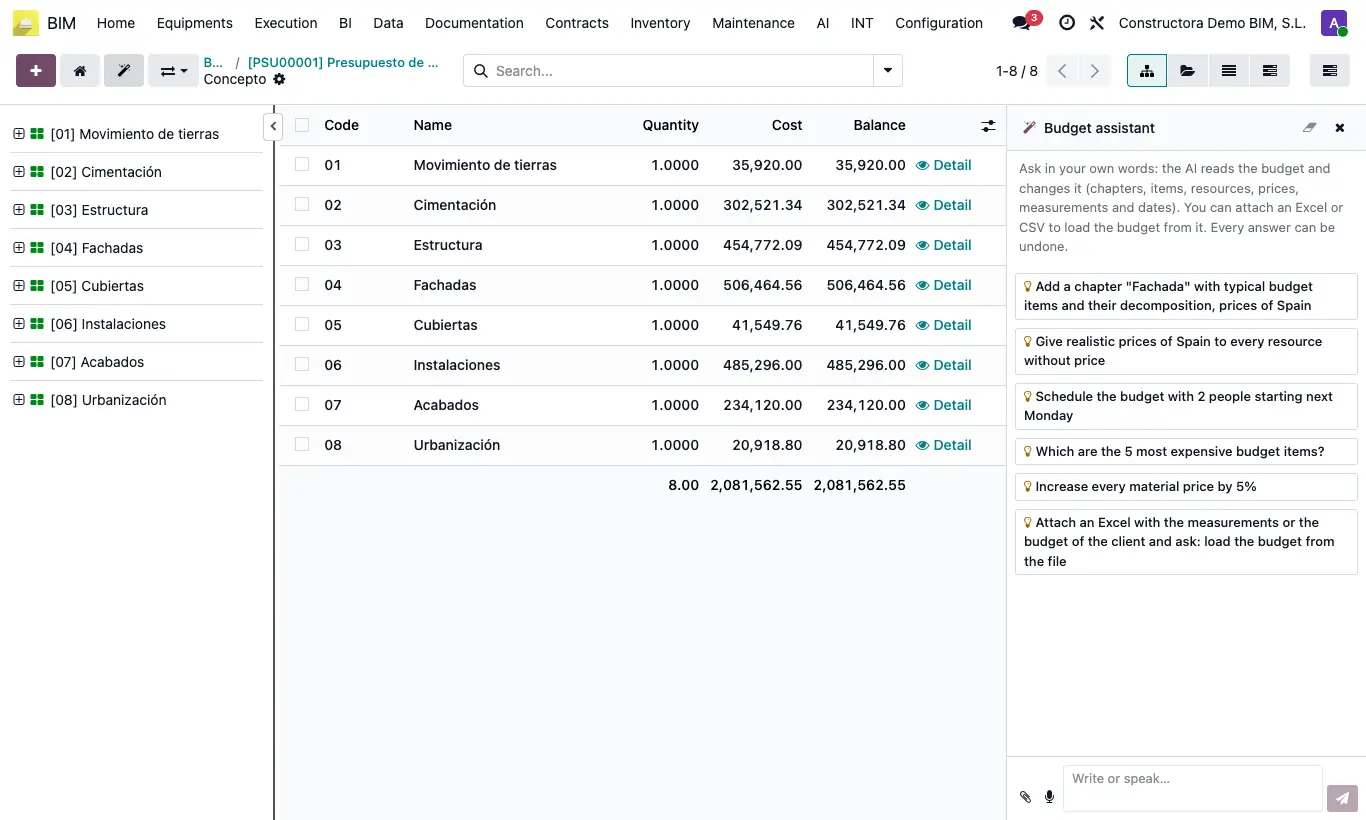
How do I use the AI assistant in the budget?

Steps

  1. Open the budget tree and click the wand icon.
  2. Type or dictate the request, for example “what are the 5 most expensive items?”.
  3. You can attach .xlsx, .xlsm, .xls or .csv files with the client's measurements and ask it to load the budget.
  4. Review the result. If you are not happy with it, click Undo.
  5. Click UPD before producing reports.
Site note

The conversation is saved in the budget.

Documented version: BIM 2.0 (base_bim_2 19.0.19.04.2026) · Odoo 19