Where Project › Register Attendance button
Before you start
Attendance profile. Budget and Concept are only visible with the profile See budget and item in documents.
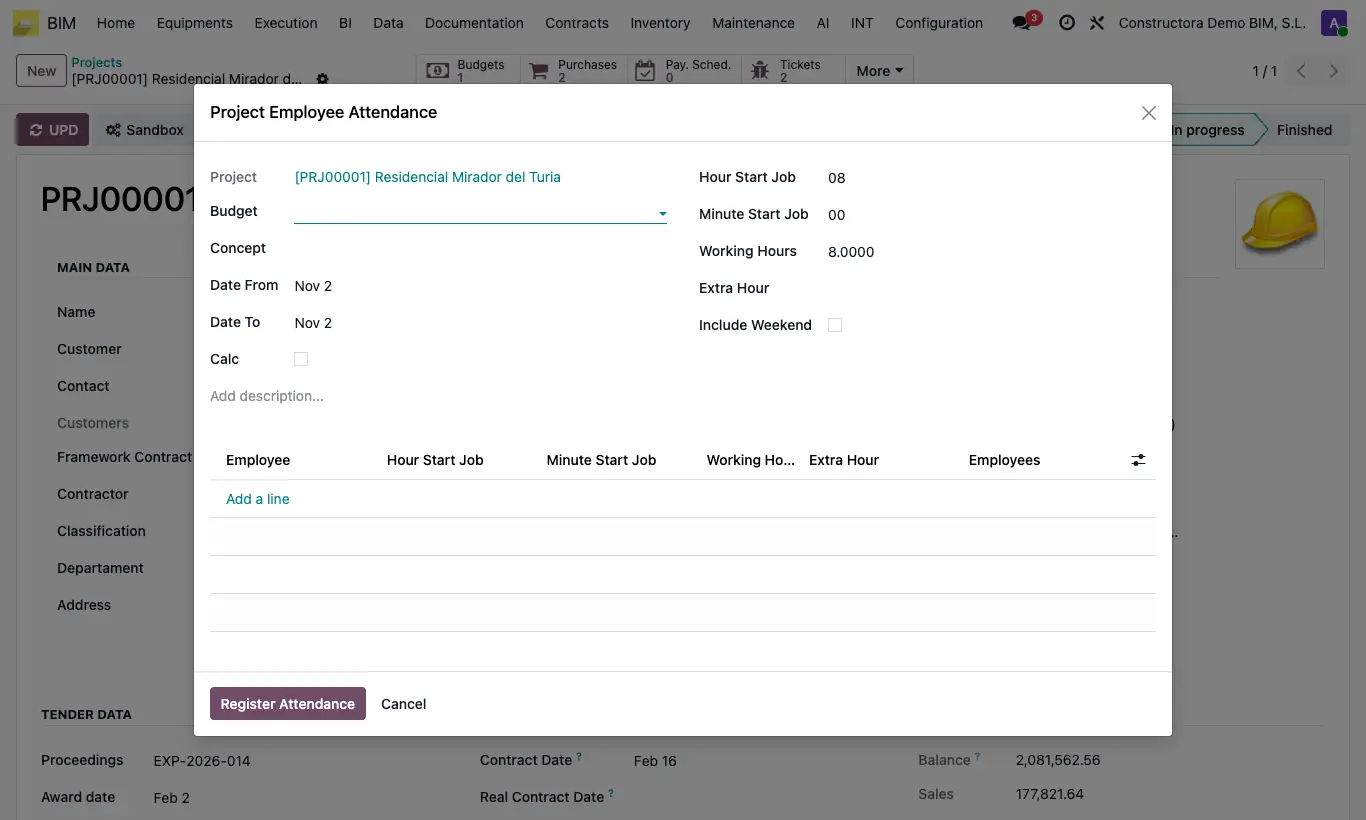
Steps
- Open the project and click Register Attendance.
- Choose Date From and Date To, and if you want Budget and Concept.
- Click Calc: the employees who have this project as their Default Project are loaded. Add or remove rows.
- Adjust Hour Start Job, Minute Start Job, Working Hours and Extra Hour: they are copied to all rows, and you can change each one.
- Tick Include Weekend if Saturday and Sunday were also worked.
- Click Register Attendance.
Warning
Without Include Weekend, Saturdays and Sundays in the range are skipped without warning. If you choose only one weekend day, it warns “Tick Include Weekend to record attendance on the selected dates”.
If the times come out shifted, check Hours of difference in settings: they are added to the check-in time.
Site note
Working Hours accepts decimals: 8.5 is 8 hours and 30 minutes.
The default values (working hours and check-in time) are set in Config › Config, in the WORKING HOURS block.