Where Chapter › Apply Concept Template button
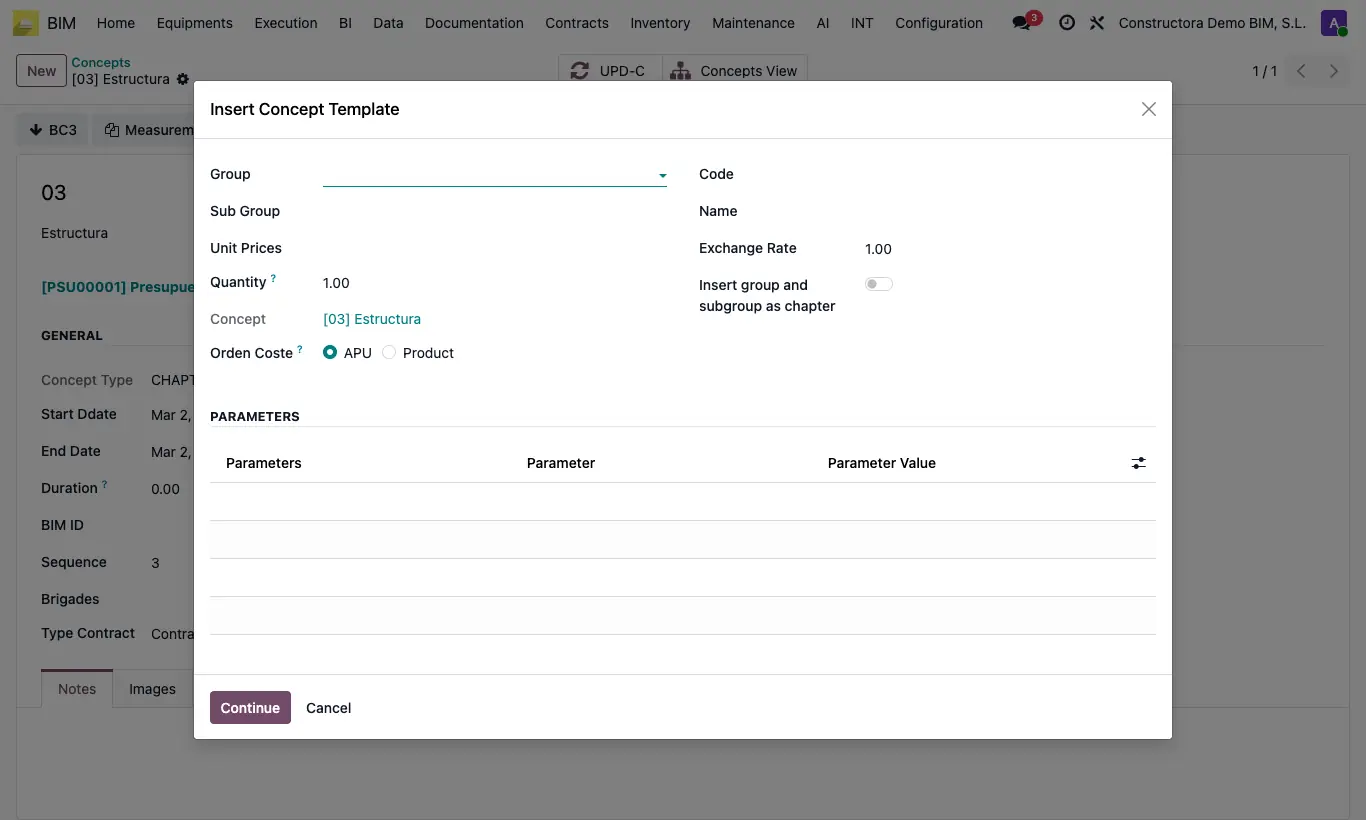
Steps
- Open the chapter where the items will go and click Apply Concept Template.
- Filter the search by Group, Sub Group, Code or Name.
- Choose one or several in Unit Prices and enter the item Quantity.
- In Orden Coste choose APU (the price saved in the unit price) or Product (the current cost of each product).
- If the unit price is in another currency, write the Exchange Rate: it multiplies the price of each resource.
- Turn on Insert group and subgroup as chapter to hang the items from chapters with the code and name of the group and subgroup (they are created if they do not exist).
- If the unit prices have parameters, the Parameters table shows them with their first value: choose another Parameter Value if needed.
- Click Continue: the budget recalculates by itself.
Warning
The item copies the breakdown at that moment: if you later change the unit price, in the budget use Up. › Update from APU.
Insert group and subgroup as chapter only works if you have chosen a Group in the filter.
Site note
To insert many at once you can also use Copy (M) in the list and Pasting (M) in the chapter.
The unit price's Departures button shows the items created from it.