Where BIM › Config › Configuration
Before you start
BIM Manager profile and Administrator role.
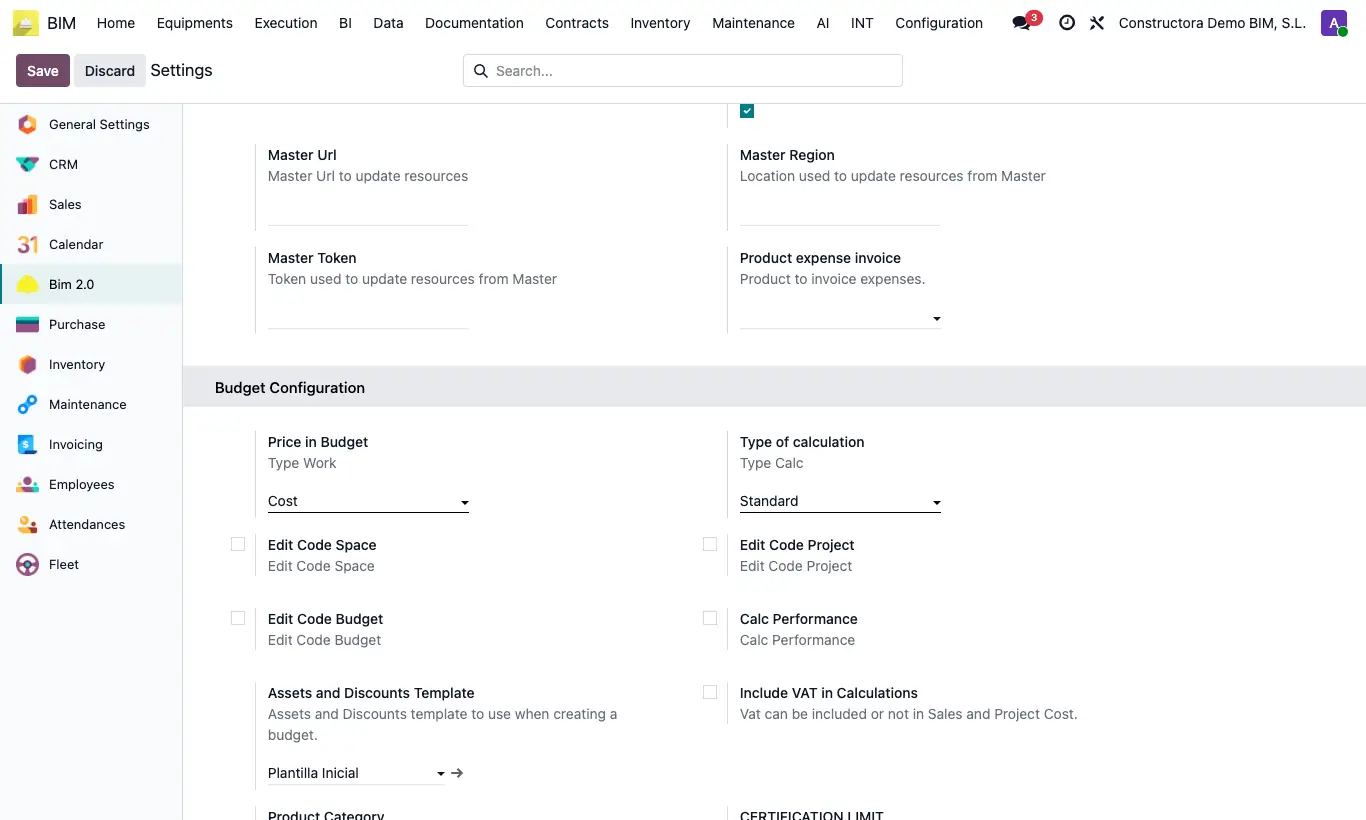
Steps
- Open the Bim 2.0 settings and scroll down to the Budget Configuration block.
- Price in Budget: where resource prices come from: Cost, Price, Rate or Cost List. Type of calculation: Standard, Apu or Apu HH.
- Edit Code Project, Edit Code Budget and Edit Code Space: allow typing those codes by hand; unticked, they are generated automatically and cannot be touched.
- Assets and Discounts Template: the one applied when creating a budget. Product Category: category of the products created from the items' resources. Include VAT in Calculations: adds VAT to sales and cost in the project reports.
- Limit Certification and Percent Limit: certification cap (100 % by default) that new budgets receive. It is checked when certifying, both by lines and by chapters.
- Performance Calculation: shows the performance fields on items. Calc Performance: on items that calculate performance, the quantity of labour and equipment is recalculated from the item's performance.
- Default calc certification (Quantity or Percent) and Default type calc (Calculated, Manual or Lock): default way to certify and to calculate the price of items.
- Click Save. Each budget can change its values in its ST tab.
Warning
If a certification exceeds the limit, it stops with “The concept … has exceeded its budget certification limit!”.
Changing these values does not modify budgets already created, except the editable codes, Performance Calculation and Calc Performance, which apply immediately.